Our Workflow with Blender and Godot
- Update
- 11 Jul 2025
- 11 min read

One of the core targets of the Blender Studio pursuing a game project was to validate and familiarize ourselves with the current state of open-source game development. Since we decided to go with Godot as our engine (and obviously Blender as our DCC), we had to set up a pipeline that is build around these two tools and would allow a team of eight people to work on the game files. In this article I want to give an outline of what we came up with.
Blender at the Center
Starting out with the project we had a dream pipeline in mind. One challenge was, that our studio is set up for film production. Our tools, our infrastructure and the skillset of the team is targeted at that. The more we could stick to what we know the better.
Ideally we would be able to leverage using Blender as much as possible and have a pipeline in place that would allow us to do asset creation, scene assembly, animation libraries and basic game-specific definitions like collisions all from Blender. Godot would only really be touched to validate how things look in the game (besides implementing the entire game logic, of course).
For that to work we'd need the ability to preview our assets in Blender the way that they look in the game. Since we went for a standard PBR workflow for the most part, this worked quite well out-of-the-box.
This kind of DCC centric workflow is not necessarily common in game development. But for us it was the right approach and enabled us play to our strengths.
glTF as the Vessel
To make our assets available in the game files we went with glTF as the exchange format. This was an obvious choice for us for multiple reasons:
- there is solid native support integrated into both Blender and Godot (materials, animations, custom mesh data)
- glTF has active ongoing development and lots of features that we would need are already supported
- its highly extensible nature meant we could build our own functionality on top
Godot also has the option to directly import .blend files, but we decided against making use of this. Importing our asset directly would mean that there is no explicit export/publishing step. So there would be no differentiation between the working files and the game asset files. This can generally work, but when collaborating with multiple people we have found that it's useful to be explicit about pushing a change into production.
Since this feature of Godot uses glTF as exchange format internally anyways, it was a much better solution for use to make that export step an explicit part of our pipeline and give us more control over that process.
Collection Exports
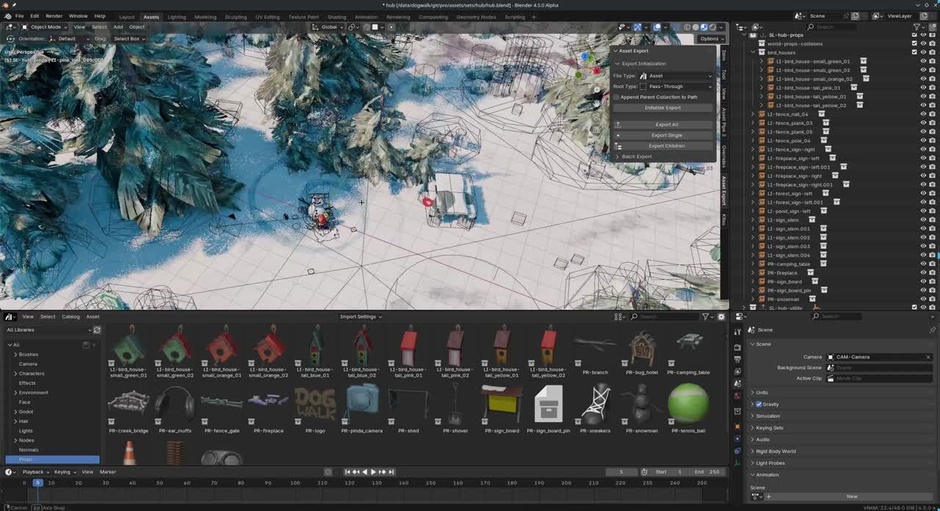
One crucial aspect of automating our export pipeline has been to use Blender's export collection feature. Rather than exporting a file in its entirity this meant that we could set up dedicated collections to export multiple individual assets. So the export settings for all assets could be set up in advance and all assets in a file could be individually exported at once.
It also allows to have all kinds of additional data for reference and such in a .blend file for working without polluting the export data.
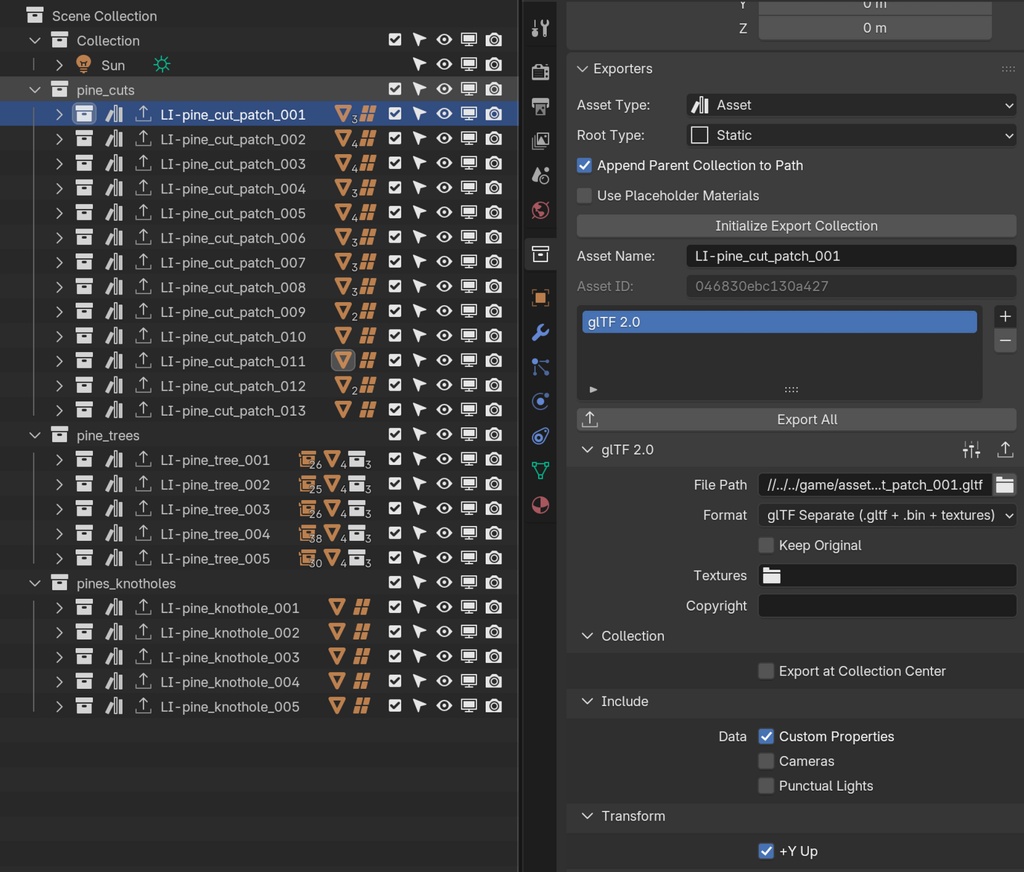
The tricky part was just the question of how we would do nesting of assets inside of each other, without exporting the nested assets redundantly. That's where some additional custom code comes in.
Custom Code for Exchange
To give us the necessary control that would make it easy for the art team to ship assets to Godot and iterate over them from Blender we had custom code on either end.
There was a Blender extension that would handle setting up and executing the export of an asset while providing all the necessary information about it. And there was a Godot plugin that would make sure on every import that the data provided is used to re-create the asset correctly and generate the required game data.
You can find the (very much) preliminary version of that code, which was good enough for us, but not a fully fleshed out tool at the end of this article.
Asset Separation
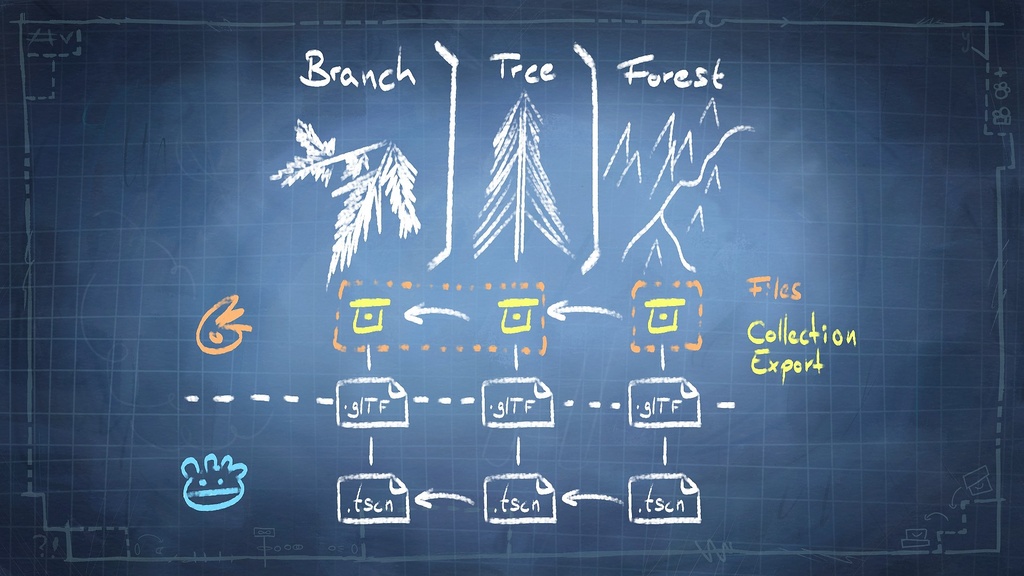
A core principle for setup was that each asset that an artist would export to the game files would only contain its own immediate data. If another asset was nested inside (e.g. collection instancing) it should be replaced with a reference and that reference should be re-created in Godot on import.
That way an tree asset and its parts could be defined in one file (potentially with an asset collection per branch) and the instancing and placement of the tree can be defined in a separate set file. The set, the tree and the branch are all separate assets, while the data of each asset is only exported once and the references that exist between the .blend files are re-created between the export files in Godot. The set asset in this case only really contains the references and transforms of other assets.
Workflow
So here is how our workflow actually looked like in practice:
Here is a quick overview of the scene assembly pipeline:
and a breakdown that goes a bit more into detail:
Initialize export based on asset type
We had different asset types that would specify certain export settings which we decided on for our project. Those types were characters, assets and animations.
To be able to export to the right place with the right settings, the export extension had an initialize button that would set up the collection exporter with the correct output path and all other settings automatically. On any work file the artist just had to press the initialize button and then the export was good to go. This relied only on using the right naming conventions.
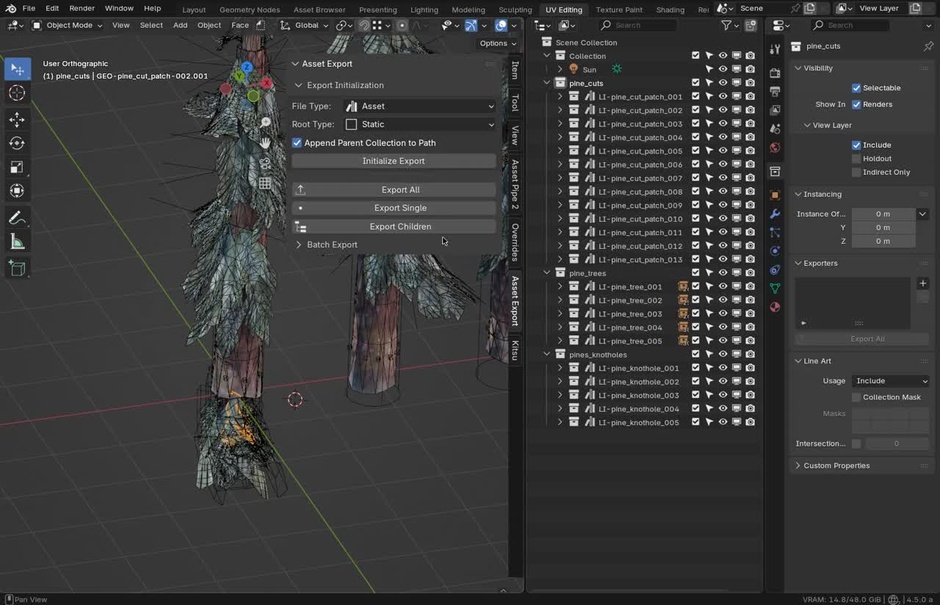
LI- in the collection name
Export data to game files
The work directory structure containing the .blend files and the game files containing the glTF exports were two separate file structures, that were basically a copy of each other.
Before every export the Blender extension would take care of a few necessary things:
- assign an ID to all assets that don't have one and register it in a central index
.jsonfile, so it could be found by ID in Godot - make sure that all collection instances are cleared of their instanced geometry for asset separation
- replace it with a simple reference of the asset ID they are instancing
- write additional information for collision and shading data into custom properties for export
After the export the extension would reset the data into a usable state, so restore the instancing data.
Textures that are used by the exported materials are also moved to the correct relative path in the game file directory to ensure that assets reusing the same textures don't duplicate them throughout the project.
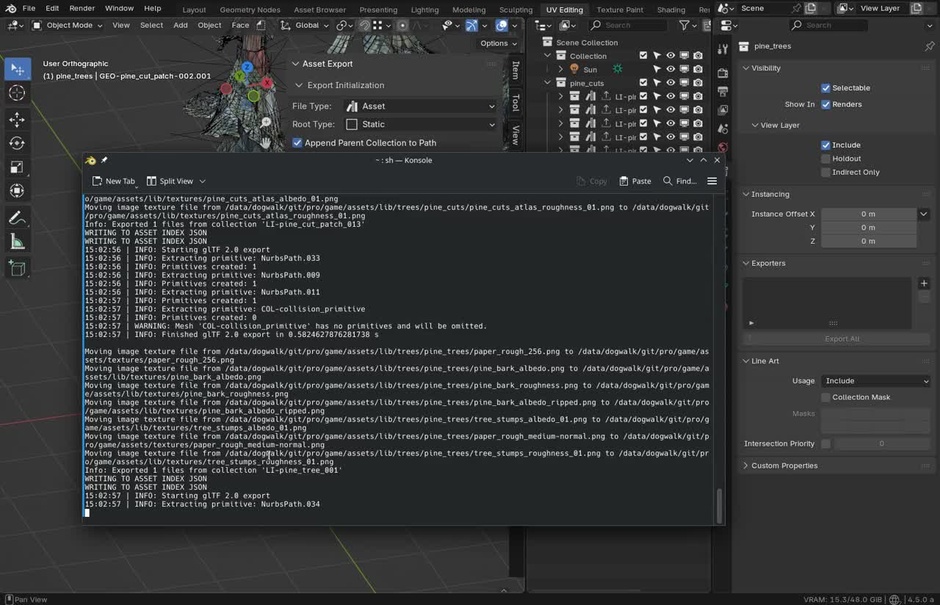
This was all done using a few basic export hooks that the exporting process would run automatically.
Information about the many available export hooks can be found here.
Import in Godot
The import process was fully automated. Godot automatically detects if there was a change to the resources and imports the new/changed files.
The code to make sure that the data is imported correctly had to run every single time that happens.
The most crucial tasks of the import plugin were to
- provide Godot resources referencing the glTF exports
- recreate the instancing hierarchy based on the asset IDs
- extract and re-use materials
- extract and register animations in the respective animation libraries
- process collision primitive/geometry
In the end we had a hierarchy of .tscn files, each of which represented an asset. These .tscn files contained a node referencing a glTF export from Blender, so any changes would be picked up. They also allowed us to assign additional nodes and scripts in the .tscn to specify the game logic of each asset manually in Godot.
Materials were all de-duplicated and referencing external resource .tres files, which would be updated automatically on import. So all the settings that our Blender shader supported could be tweaked in Blender and update on import. All other settings that only worked on the Godot end were controlled there.
Commit and Push
We worked on this project with a team of multiple artists. A crucial part of our pipeline was consequentially also version control. Godot would generate a bunch of data on import. So if an artist would just commit their exported glTF and call it a day, on every other artist's machine Godot would automatically import the file and generate that import data.
For a single person working on their own game this wouldn't be a problem, but for us it was a real issue. So it was really important that, before commiting their changes, everyone would open the game in Godot, to give Godot the opportunity to create that import data and then commit it alonside new export data.
Caveats and Lessons Learned
There were a few issues with our approach. Some things I would do differently if I were to start over.
The central asset index was a big point of friction and frequently caused issues with merge conflicts, since this was the one file that multiple people would need to write to constantly.
In a new version I would write the asset index not in a centralized place that needs to be versioned, but rather build it dynamically from the hierarchy of assets on the client side.
Another issue was that duplicating assets meant that their ID would also be duplicated. We frequently had the issue that there would be a collision of multiple materials that had been created by duplicating another one, that was already listed in the index. The only way to resolve this, so far, was to delete the ID manually after duplication. Automating this is tricky, since I couldn't hook up to the duplication process itself and afterwards, figuring out which on is the real and which one is the fake is not trivial.
If Blender were to introduce UIDs, like Godot is using, this could also be used for better mapping between the programs. (Purely hypothetically...)
The way that materials were exported, we didn't have one ground truth for a material's settings in the game files. The properties would depend of the order of importing. This wasn't usually a real issue, but in the future I would have separated the export data for materials out into their own dedicated glTF, just like we did it for other assets.
Future
Besides our own project there are, of course, other ongoing efforts in the direction of smooth workflow between Blender and Godot. A lot of this is based on the development of glTF as the exchange format lead by the Khronos Group and various extensions of the format for game development.
One of these developments is for example glTF for complex scenes. This would replace a large chunk of what we have built our pipeline around to allow the nesting of different glTF assets.
The nice folks over at the Godot Foundation have been very eager to help us make the project a success. And even now after the project is wrapped up, I really hope that we can find the time to get together and find a way to even out the few bumps on the road that we ran into throughout the production.
Get the code
Of course, writing about what we did is nice, but actually sharing the code is another thing.
I want to make sure that it's clear that this is very much just a prototype that we build internally for our pipeline and we're sharing it as that, not as a usable product like we do with our Blender Studio Tools.
There would be a large amount of extra work involved to make this a functional tool, that's easy to use and flexible enough to integrate into a pipeline. And at the moment we would rather spend that energy on helping to make sure Blender and Godot support a native smooth workflow out-of-the-box.
There is also no documentation, nor can we provide support or using the
That said, it might still be of use to some people to look into the code or maybe you can even get it to run for yourself.
So here is the entire production repository in all its glory, including the pipeline setup with export Blender extension and import Godot plugin:

Blender File - 9.9 GB - CC-BYdogwalk-repo.zip
Join to leave a comment.