Blender Studio
  • Films
  • Projects
  • Training
  • Assets
  • Blog
  • Community
  • Join
  • BLENDER.ORG

    • Download

      Get the latest Blender, older versions, or experimental builds.

    • What's New

      Stay up-to-date with the new features in the latest Blender releases.

    LEARNING & RESOURCES

    • Blender Studio

      Access production assets and knowledge from the open movies.

    • Manual

      Documentation on the usage and features in Blender.

    DEVELOPMENT

    • Developers Blog

      Latest development updates, by Blender developers.

    • Documentation

      Guidelines, release notes and development docs.

    • Benchmark

      A platform to collect and share results of the Blender Benchmark.

    • Blender Conference

      The yearly event that brings the community together.

    DONATE

    • Development Fund

      Support core development with a monthly contribution.

    • One-time Donations

      Perform a single donation with more payment options available.

Training Highlights
Facial Rigging
Blender Fundamentals 4.5 LTS
3D Printing with Blender
Video Log #6: Promo video

Training types
Course Documentation Production Lesson Worskhop

Training categories
Animation Geometry Nodes Lighting Rendering Rigging Shading
Film Highlights
Singularity
2025
Wing It!
2023
Spring
2019
Hero
2018
Project Highlights
Impulse Purchase
Showcase
Project Storm
Showcase
DogWalk
Showcase
Project Gold
Showcase
Assets Highlights
Characters
Models & rigs
Assets
All production files
Libraries
Curated sets
Course
Stylized Character Workflow
Intro
  1. 01

    Introduction

    Free
  2. 02

    Introduction Update

    Free
1: Head Sculpting
  1. 01

    Defining Goals

    Free
  2. 02

    Research

  3. 03

    Blender Setup

  4. 04

    Sculpting a Primitive Head Shape

  5. 05

    Sculpting a complete Planar Head

  6. 06

    Smoothing the Planar Head

  7. 07

    Stylising the Head Sculpt

  8. 08

    Timelapse: Sculpting Rain's Head

  9. 09

    Timelapse: Vertex Painting

  10. 10

    Timelapse: Sculpting Hair

  11. 11

    Timelapse: Head Design Variations

  12. 12

    Timelapse: Finishing Rain's Head Design

2: Body & Outfit Sculpting
  1. 01

    Creating a Primitive Body

    Free
  2. 02

    Sculpting the Planar Torso

  3. 03

    Sculpting the Planar Arms & Legs

  4. 04

    Sculpting the Planar Hands & Feet

  5. 05

    Smoothing & Stylising the Body

  6. 06

    Creating Clothing Basemeshes

  7. 07

    Update: Optimal Clothing Basemesh

  8. 08

    Modelling additional Basemeshes

  9. 09

    Stretching vs Compression

  10. 10

    Sculpting Wrinkles & Folds

  11. 11

    Polishing the Surfaces

  12. 12

    Finishing the additional Elements

  13. 13

    Timelapse: Sculpting Rains Body

  14. 14

    Timelapse: Rains Autumn Outfit

  15. 15

    Timelapse: Adjusting Proportions and the Outfit

  16. 16

    Timelapse: Rains Summer Outfit

  17. 17

    Timelapse: Sculpting Rains final Outfit

3: Expression Testing
  1. 01

    Fast & rough Retopology for the Head

  2. 02

    Modelling the inner Head & transferring Details

  3. 03

    Adding the teeth, gums & tongue

  4. 04

    Basic Expression Shapekeys

    Free
  5. 05

    Sculpting an Expression

  6. 06

    Breakdown: Expression Guide Part 1

    Free
  7. 07

    Breakdown: Expression Guide Part 2

  8. 08

    Breakdown: Design Adjustments

  9. 09

    Breakdown: Adding extra Appeal

4: Clean Retopology
  1. 01

    Retopology Introduction

  2. 02

    Creating & Guiding Topology

  3. 03

    Planning the Facial Retopology

    Free
  4. 04

    Retopology Setup

  5. 05

    Facial Retopology - Edge Flow & Articulation

  6. 06

    Update: Strategic 2-Poles

  7. 07

    Facial Retopology - Patches & Poles

  8. 08

    Facial Retopology - Creases & Tweaking

  9. 09

    Timelapse: Head Retopology

  10. 10

    Timelapse: Body Retopology

  11. 11

    Timelapse: Inner Body & Transfering Volume

  12. 12

    Timelapse: Head Objects & Tweaking

  13. 13

    Timelapse: Hair Retopology

  14. 14

    Timelapse: Shirt & Pants Retopology Pt.1

  15. 15

    Timelapse: Shirt & Pants Retopology Pt.2

  16. 16

    Timelapse: Shoe modeling & additional Tweaking

  17. 17

    Timelapse: Scarf Retopology & Finishing Touches

5: Bonus Chapter: Snow
  1. 01

    Timelapse: Sculpting Snow's Head

    Free
  2. 02

    Timelapse: Sculpting Snow's Body

  3. 03

    Timelapse: Polishing Snow

  4. 04

    Timelapse: Sculpting Snow's Outfit

  5. 05

    Timelapse: Remeshing & Adjusting Snow

  6. 06

    Timelapse: Snow's Expression Tests

  7. 07

    Timelapse: Posing Snow

  8. Live: Face Retopology Free
  9. Live: Head Retopology Free
  10. Live: Hair Retopology Free
  11. Live: Upper Body Retopology Free
  12. Live: Body Retopology Free
  13. Live: Retopo tweaks & outfit Free
  14. Live: Outfit Retopology Free
  15. Live: Retopology Finale Free
  16. Live: Body UV Mapping Free
  17. Live: Outfit UV Mapping Free
  18. Live: UV Mapping Finale Free
  19. Live: Base Colors & Preparations Free
  20. Live: Tiles & Procedural Detail Free
  21. Live: Height Map Painting Free
  22. Live: Detail Extraction & Stitches Free
  23. Live: Textures & Procedural Eyes Free
  24. Live: Procedural Skin & Hair Anisotropy Free
  25. Live: Turntable & Hair Textures Free
  26. Live: Baking & Final Renders Free
Bonus Videos
  1. 01

    Youtube Version: Stylized Character Workflow in Blender 2.81

    Free
  2. 02

    Snow Character Creation Recap

    Free
  3. 03

    Sculpting Fundamentals

    Free
  4. 04

    Preventing/Fixing Boolean Errors

Cheat Sheets
  1. Topology Guides - Killing/Directing Loops
  2. Topology Guides - Poles & Edge Flow Free
  3. Topology Guides - Stretching & Pinching
  4. Topology Guides - Hiding Stretching
  5. Topology Guides - Strategic 2-Poles
  6. Topology Guides - Hard-Modeling Creases
  7. Facial Topology - Edge Flow
  8. Facial Topology - Landmarks
  9. Facial Topology - Articulation
  10. Facial Topology - Patches & Poles
  11. Facial Topology - Creases
  12. Facial Topology - Deformations
  13. Retopology Setup
  14. Body Topology - Seperate Limbs
  15. Body Topology - Joint Loops
  16. Body Topology - Finishing Touches
Course Lesson .blend files
  1. File 1: Head Sculpting Lessons
  2. File 2: Body Sculpting Lessons
  3. File 3: Topology Examples
  4. File 4: Facial Topology & Planning
Final Renders
  1. Rain - Final Render Free
  2. Rain - Turnaround Free
  3. Rain - Turnaround (Clay) Free
  4. Rain - Turnaround (Wire) Free
  5. 05

    Rain - Turntables

    Free
  6. Snow - Final Render Free
  7. Snow - Turnaround Free
  8. Snow - Turnaround (Clay) Free
  9. Snow - Turnaround (Wire) Free
  10. 10

    Snow - Turntables

    Free
  11. Rain & Snow - Final Render Free
Rain - Character Development
  1. 1 - Head Exploration
  2. 1 - Head Polish
  3. 2 - Body Iterations
  4. 2 - Outfit Variations
  5. 05

    3 - Expression Tests

  6. 4 - Retopology
  7. 4 - UV unwrapping
  8. 08

    5 - Turntable Renders

  9. 6 - Pose Exploration
  10. 10

    6 - Pose Polishing

Rain .blend files
  1. Rain - File 1: Head Sculpting
  2. Rain - File 2: Body & Outfit Sculpting
  3. Rain - File 3: Expression Tests
  4. Rain - File 4: Retopology & UV mapping
  5. Rain - File 5: Shading & Texturing
  6. Rain - File 6: Posing
  7. Rain - File 7: Lighting & Composition
Snow .blend files
  1. Snow - File 1: Concept
  2. Snow - File 2: Sculpting
  3. Snow - File 3: Testing
  4. Snow - File 4: Retopology
  5. Snow - File 5: UVs & Shading
  6. Snow - File 6: Rendering & Compositing
Snow - Character Development
  1. 1 - Concept Drawings
  2. 2 - Head Sculpting
  3. 3 - Full Body Sculpting
  4. 4 - Outfit Sculpting
  5. 05

    5 - Expression Tests

  6. 6 - Pose test
  7. 7 - Retopo (Face)
  8. 08

    8 - Retopo (Head)

  9. 09

    9 - Hair Retopology

  10. 10

    10 - Body Retopology

  11. 11

    11 - Outfit Retopology

  12. 12

    12 - Turntable Tests

More Resources
  1. Base Meshes
  2. Matcap: Default with Specular
  3. Matcap: Gradient
  4. Matcap: Ghost
Addons
  1. Screencast Keys
  2. Magic UV

Login to view this content

Join Blender Studio for just ¥90/month and get instant access to all of our training and film assets!

Login Join Blender Studio
5: Bonus Chapter: Snow

Timelapse: Snow's Expression Tests

Krystal
Krystal Author
License Krystal Institute
Report Problem

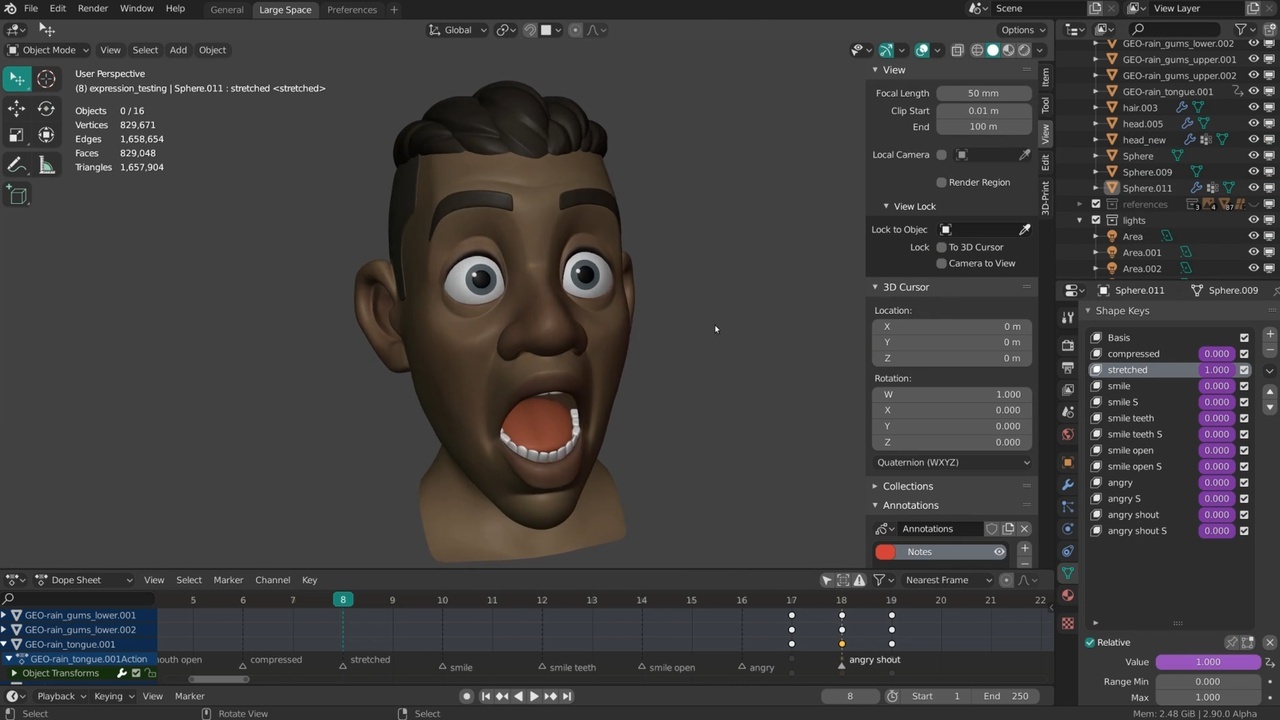
With this video I am finally adding some actual timelapses to this chapter in addition to the previous breakdown videos. Most of this is the same workflow so I'll not comment on it too much, like starting with the basic shapekeys like closed eyes and an open mouth. One of the differences with Snow is that I tried to shrinkwrap the sculpted details on the mouth & eyelids as well. This made it harder to close the eyes but I got to keep some of the small details. I still recommend to not have any sculpted detail on the multires modifier for the eyes & mouth area tough. Nowadays I would use the "Multires Dispplacement Eraser" brush to get rid of these.

Instead of using vertex groups I updated my workflow to use the Face Sets in sculpt mode. This lets you very quickly mask and hide portions of your object in sculpt mode. Face Sets can very easily be generated from Edit Mode selections, UV seams, Materials and separated geometry. I also used the transform tools in sculpt mode to rotate and move geometry but some precise tweaking of vertices was still done in Edit Mode.

The temporary lighting setup I made in Eevee made it clear that I would eventually need to change the skin tone but the current one still worked better when using Matcaps. Animating the shapekeys as you are working on them and adding Drivers still helps to quickly compare the default expression with the tests. Eventually I mixed shapekeys to create new ones but I always recommend now to "create new shapekeys from mix" because then each expression is independent and can be tweaked separately. Don't mix shapekeys in that are meant for another expression!

Whenever I wanted to exaggerate some specific creases I usually went into edit mode to push specific edges and vertices closer to another. A relatively high base resolution is necessary for this and in the past I had to subdivide the head mesh too often because I didn't take that into account.

At one point I tried automating the eyebrow shapekeys a bit by adding a surface deform modifier so that it automatically follows the skin underneath. This modifier I could then regularly apply as a shapekey and then tweak further. This became a bit cumbersome though because the modifier only gave a preview in object mode. So it was hard to predict where the eyebrows were or would end up.

There weren't many adjustments I made to the design as a result of these expression tests. One of them was the height of the brow vs the nose since it was difficult to get a believable crease during the squashing of the face. The bridge of the nose should be mostly solid so the crease ended up as way too high in comparison to the eyes. So I lowered the highest point of the nose bridge.

With Snow I didn't add any head rotation or eye direction though.

Links:

  • Blender Studio YouTube Channel: Here you will be able to find the latest live steams and more.
  • Snow Sculpting File: The sculpting file of this and the following timelapses and live streams.
  • Snow Expression/Pose Testing File: The file that contains all final expression sculpts and the pose sculpt next to Rain.

General Links

  • Short version of the creation of Rain
  • Recap video of the creation of Snow
  • Rain .blend files
  • Snow .blend files
  • Course Resources

Join to leave a comment.

Films Projects Training Blog
Characters
  • Storm
  • Mikassa
  • Whale
  • Ballan Wrasse
Studio
  • Terms & Conditions
  • Privacy Policy
  • Contact
  • Remixing Music
  • blender.org
Blender Studio

The creators who share.

Artistic freedom starts with Blender powered by CG Global Entertainment Ltd.
粤ICP备2024327355号-3