Blender Studio
  • Films
  • Projects
  • Training
  • Assets
  • Blog
  • Community
  • Join
  • BLENDER.ORG

    • Download

      Get the latest Blender, older versions, or experimental builds.

    • What's New

      Stay up-to-date with the new features in the latest Blender releases.

    LEARNING & RESOURCES

    • Blender Studio

      Access production assets and knowledge from the open movies.

    • Manual

      Documentation on the usage and features in Blender.

    DEVELOPMENT

    • Developers Blog

      Latest development updates, by Blender developers.

    • Documentation

      Guidelines, release notes and development docs.

    • Benchmark

      A platform to collect and share results of the Blender Benchmark.

    • Blender Conference

      The yearly event that brings the community together.

    DONATE

    • Development Fund

      Support core development with a monthly contribution.

    • One-time Donations

      Perform a single donation with more payment options available.

Training Highlights
Facial Rigging
Blender Fundamentals 4.5 LTS
3D Printing with Blender
Video Log #6: Promo video

Training types
Course Documentation Production Lesson Worskhop

Training categories
Animation Geometry Nodes Lighting Rendering Rigging Shading
Film Highlights
Singularity
2025
Wing It!
2023
Spring
2019
Hero
2018
Project Highlights
Impulse Purchase
Showcase
Project Storm
Showcase
DogWalk
Showcase
Project Gold
Showcase
Assets Highlights
Characters
Models & rigs
Assets
All production files
Libraries
Curated sets
Workshop
Dogwalk Asset Creation Workflow
Introduction Dogwalk Asset Creation Workflow
  1. 01

    Barrel Birdhouse

    Free
  2. Download Files
01. Painting
  1. Concept
  2. 02

    Painting & Papercraft

  3. Scanned Texture
02. Texture Adjustments
  1. 01

    Straighten Texture

  2. 02

    Cutting Pieces Out

  3. 03

    Sharpening Albedo

  4. 04

    Creating Roughness

03. Modeling the Barrel
  1. 01

    Start Modeling

  2. 02

    Adding Curve Circle

  3. 03

    Folding Paper Segments

  4. 04

    Tweaks and Adding Snow Patch

  5. 05

    Adding Pole

04. Assembling Set Piece
  1. 01

    Changing Pole Material

  2. 02

    Adjusting Barrel Material

  3. 03

    Adding Birdhouses & Grass

  4. 04

    Barrel Normal Map and Test Patch

  5. 05

    Adding Collision & Leash Points

  6. 06

    Set Dressing

05. Godot Showcase
  1. 01

    Godot Playtesting

Login to view this content

Join Blender Studio for just ¥90/month and get instant access to all of our training and film assets!

Login Join Blender Studio
04. Assembling Set Piece

Adding Collision & Leash Points

Krystal
Krystal Author
License Krystal Institute
Report Problem

Steps:

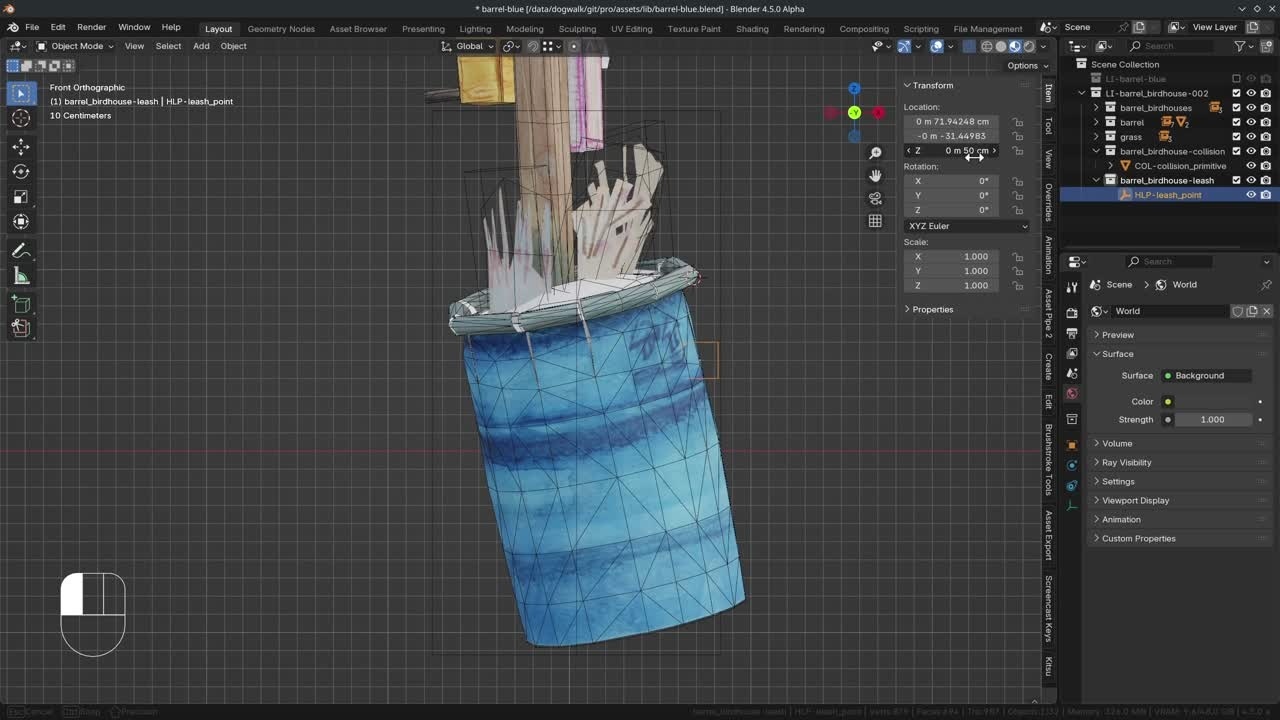
1.  Create two new collections: 1. "barrel_birdhouse-collision" and 2. "barrel_birdhouse-leash".

2.  With the "Asset Browser" open got to the "Godot" catalog (clear any searches) and drag the "COL-collision_primitive" into the viewport, place it in the correct collection and make it local.

3.  Adjust any collision shape properties in the modifier panel. Make sure it is tall enough to minimize the chance of the characters to get on top of it.

4.  Add an empty and make it 0.1 (10cm in my case) and name it "HLP-leash_point". Most of the assets have their leash points between 30 and 60 cm, in this case I set it around the most common value of 40 cm. The leash is placed around this height a lot.

5.  Place it around the object but maintain the height.

6.  When you are done, "Mark as Asset" the barrel and barrel_birdhouses so it is accessible from the "Asset Browser".

7.  In the "Unassigned" catalog, you can find the assets. You can drag these to the "Props" so we can drag them into the set file.

8.  This part is unfortunately demo only. For Dogwalk we created the "Asset Export" addon which handles a lot of manual labor. It assigns collections we want to export and points them to the correct directory. Once we exported the asset, we can simply switch to Godot, and we should be able to find it. In the video: we created assets, so the "File Type" is "Asset". The root has to do with collision, which we have. Then we hit "Initialize Export" and hit "Export All".

Join to leave a comment.

Films Projects Training Blog
Characters
  • Storm
  • Mikassa
  • Whale
  • Ballan Wrasse
Studio
  • Terms & Conditions
  • Privacy Policy
  • Contact
  • Remixing Music
  • blender.org
Blender Studio

The creators who share.

Artistic freedom starts with Blender powered by CG Global Entertainment Ltd.
粤ICP备2024327355号-3