Blender Studio
  • Films
  • Projects
  • Training
  • Assets
  • Blog
  • Community
  • Join
  • BLENDER.ORG

    • Download

      Get the latest Blender, older versions, or experimental builds.

    • What's New

      Stay up-to-date with the new features in the latest Blender releases.

    LEARNING & RESOURCES

    • Blender Studio

      Access production assets and knowledge from the open movies.

    • Manual

      Documentation on the usage and features in Blender.

    DEVELOPMENT

    • Developers Blog

      Latest development updates, by Blender developers.

    • Documentation

      Guidelines, release notes and development docs.

    • Benchmark

      A platform to collect and share results of the Blender Benchmark.

    • Blender Conference

      The yearly event that brings the community together.

    DONATE

    • Development Fund

      Support core development with a monthly contribution.

    • One-time Donations

      Perform a single donation with more payment options available.

Training Highlights
Facial Rigging
Blender Fundamentals 4.5 LTS
3D Printing with Blender
Video Log #6: Promo video

Training types
Course Documentation Production Lesson Worskhop

Training categories
Animation Geometry Nodes Lighting Rendering Rigging Shading
Film Highlights
Singularity
2025
Wing It!
2023
Spring
2019
Hero
2018
Project Highlights
Impulse Purchase
Showcase
Project Storm
Showcase
DogWalk
Showcase
Project Gold
Showcase
Assets Highlights
Characters
Models & rigs
Assets
All production files
Libraries
Curated sets
Workshop
Dogwalk Asset Creation Workflow
Introduction Dogwalk Asset Creation Workflow
  1. 01

    Barrel Birdhouse

    Free
  2. Download Files
01. Painting
  1. Concept
  2. 02

    Painting & Papercraft

  3. Scanned Texture
02. Texture Adjustments
  1. 01

    Straighten Texture

  2. 02

    Cutting Pieces Out

  3. 03

    Sharpening Albedo

  4. 04

    Creating Roughness

03. Modeling the Barrel
  1. 01

    Start Modeling

  2. 02

    Adding Curve Circle

  3. 03

    Folding Paper Segments

  4. 04

    Tweaks and Adding Snow Patch

  5. 05

    Adding Pole

04. Assembling Set Piece
  1. 01

    Changing Pole Material

  2. 02

    Adjusting Barrel Material

  3. 03

    Adding Birdhouses & Grass

  4. 04

    Barrel Normal Map and Test Patch

  5. 05

    Adding Collision & Leash Points

  6. 06

    Set Dressing

05. Godot Showcase
  1. 01

    Godot Playtesting

Login to view this content

Join Blender Studio for just ¥90/month and get instant access to all of our training and film assets!

Login Join Blender Studio
03. Modeling the Barrel

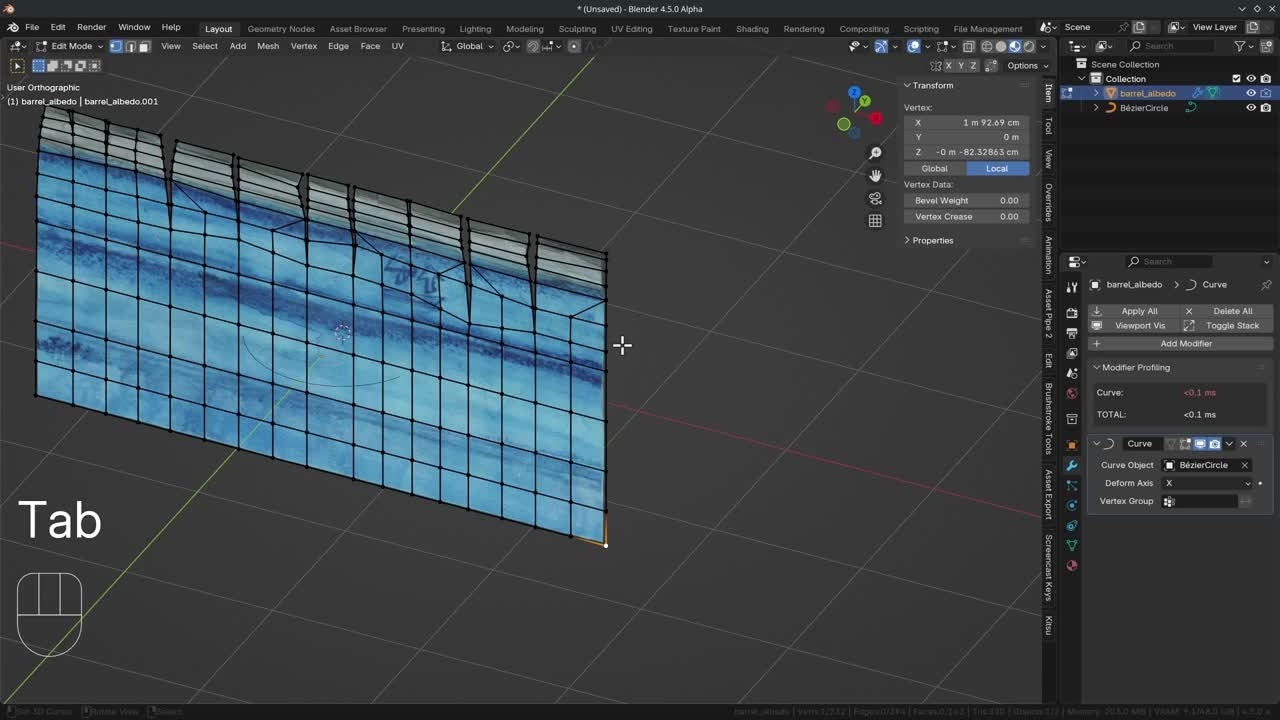
Folding Paper Segments

Krystal
Krystal Author
License Krystal Institute
Report Problem

Steps:

  1. Go into Edit Mode and in the modifier Enable Edit Mode Preview. We can now fold one side behind the other by moving the edge on the Y-axis.
  2. Next, we add a Triangulate modifier to see how our model will end up in Godot.
  3. Back in the Curve Modifier, we can enable "On Cage" to preview the final deformation in Edit Mode.
  4. In the 3D Viewport, hit T and select the "Cursor" button. Also change the Snap to "Vertices" and the Transform Pivot to "3D cursor".
  5. Now we can Snap the 3D Cursor by dragging with the LMB and selecting the paper segments. Fold the paper segments over. Take some time to get this right. I also added more edge loops and used slide to adjust them.
  6. We can add little tears in some of the paper segments by selecting edges and hitting V to rip the edge.
  7. Continue to adjust until you are happy. I also set the shading to Smooth W > Shade Smooth.

Join to leave a comment.

Films Projects Training Blog
Characters
  • Storm
  • Mikassa
  • Whale
  • Ballan Wrasse
Studio
  • Terms & Conditions
  • Privacy Policy
  • Contact
  • Remixing Music
  • blender.org
Blender Studio

The creators who share.

Artistic freedom starts with Blender powered by CG Global Entertainment Ltd.
粤ICP备2024327355号-3