Login to view this content
Join Blender Studio for just ¥90/month and get instant access to all of our training and film assets!
03. Modeling the Barrel
Adding Curve Circle

Krystal
Author
Steps:
- Let's first rotate the barrel object so it is standing up straight. Rotate on the X-axis and align the object with the horizontal grid line so it is placed in the positive Z-axis. Make sure to apply scale and rotation Ctrl + A.
- Add a Curve Circle Shift + A > Curve > Curve Circle.
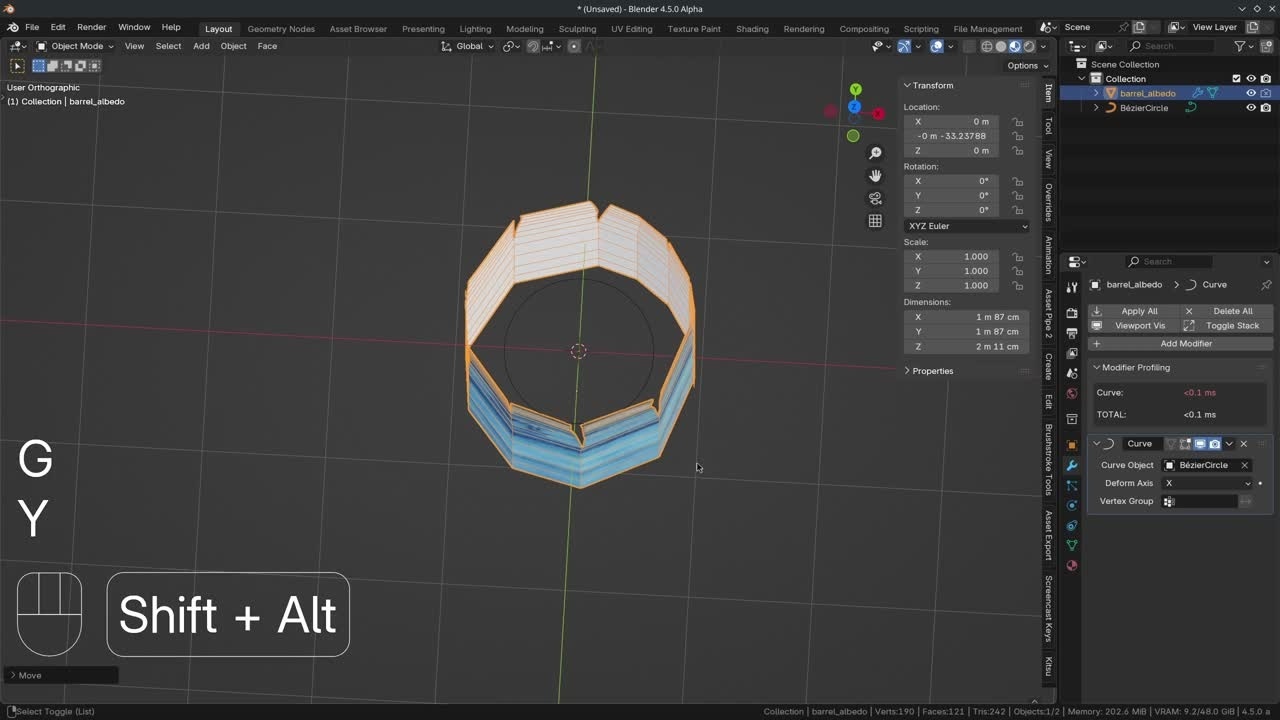
- Select the barrel object and add a curve modifier (Shift + A and search for curve). Hover your cursor above the Curve Object Field and tap E to sample the curve circle object.
- As you can see the barrel is inside out, we can solve this by selecting the Curve Circle object, go into Edit Mode, press W > Switch Direction.
- We can scale the curve S down a bit so we complete the barrel cylindrical shape. You can move the barrel object on the Y-axis to change its size.
- Add more loops by using the Knife tool K in Edit Mode. By holding Shift to only add edge along the center of the existing geometry (center of the edges).
Join to leave a comment.